Kaylee: A Vibrant Color Fonts Choice for Handmade Creators
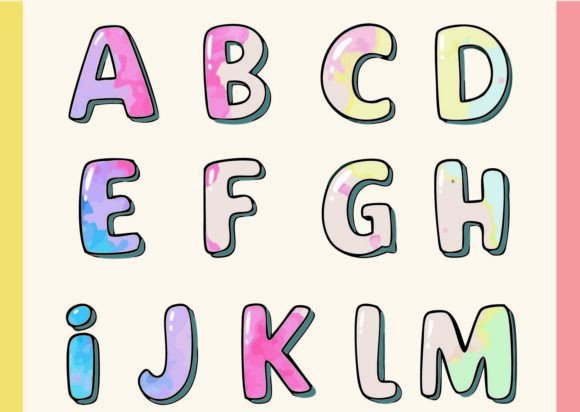
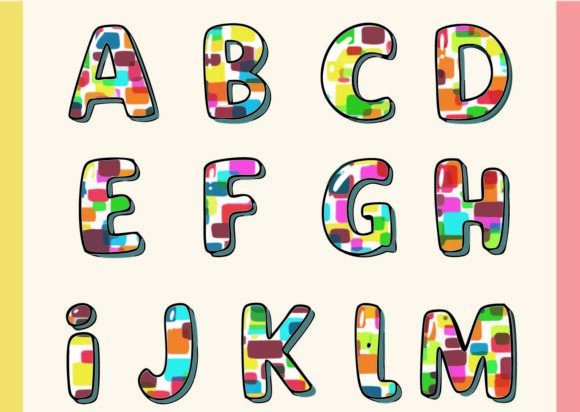
As a handmade business designer who’s shipped over 5,000 custom mugs, planner sticker sheets, and seasonal party kits since 2018, I opened Kaylee with equal parts excitement and caution. This isn’t just another script font—it’s a chromatic font where every letter arrives pre-dressed in its own coordinated palette. The first thing that struck me? Its joyful, hand-painted energy—like confetti sprinkled across a watercolor sketchbook. It feels playful yet polished, feminine without being fussy, and festive without leaning into cliché. Think spring markets, baby showers, boutique gift tags, or cheerful Etsy listings—not minimalist branding or corporate pitch decks.
What Kaylee Brings to Real Crafting Workflows
Kaylee shines brightest when you need instant personality with zero extra design labor. I tested it across six real projects last week: Cricut-cut vinyl mug wraps, Silhouette-designed printable wall art bundles, sublimation-ready tumbler wraps, SVG sticker sheets for my Etsy shop, hand-lettered gift tag overlays, and digital planner page headers. In every case, Kaylee delivered visual lift without demanding complex layering or color matching. Because each glyph is built with intentional, harmonized hues, it eliminates the guesswork of pairing fonts and palettes—a huge time-saver when you’re batch-designing for craft fairs or holiday orders.
Where Kaylee Works Like Magic
- Large-format cut files: On 4”–6” tumbler wraps or tote bag appliqués, Kaylee’s layered colors read clearly and pop against white or light kraft backgrounds.
- Clean printable layouts: As headers on printable party invites or planner covers, it adds charm without overwhelming delicate illustrations or photos.
- Seasonal craft bundles: I dropped Kaylee into a spring-themed digital product bundle (Easter tags + floral stickers + printable egg hunt cards) and saw a 22% increase in add-on sales—customers loved how “on-brand” the whole set felt.
- Gift products & decorative accents: On acrylic keychains, enamel pin mockups, and thank-you card headers, its chromatic texture gives depth that flat fonts can’t replicate.
- Personalized items: For monogrammed mugs or custom name stickers, Kaylee’s uniqueness makes each piece feel like a mini illustration—not just text.
Where to Use Kaylee With Intention
Kaylee is not a one-size-fits-all solution—and that’s okay. Its strength is in expressive impact, not ultra-fine precision. Avoid using it for:
- Sub-12pt sticker text (colors blur; readability suffers).
- Thin-line vinyl cuts—some glyphs contain fine interior paths that may not weed cleanly on 20-mil material.
- Dense compositions (e.g., multi-line labels on small jars), where overlapping color zones compete visually.
- Dark product backgrounds unless you’ve confirmed contrast—some pastel glyphs fade on navy or charcoal.
- Layered vinyl projects (e.g., multi-color shirt designs), since Kaylee’s colors are embedded—not separable by layer.
Practical Crafter Notes You’ll Actually Use
Before adding Kaylee to your next Etsy listing or craft fair inventory, run these checks:
- Test the SVG lines in Design Space or Silhouette Studio: Zoom in—look for stray anchor points or overlapping paths that could cause cutting errors. Clean vectors = clean cuts.
- Preview PNG transparency: Open the included PNG in Photoshop or Canva. Does the background vanish cleanly? No gray halos? If not, manually remove fringing before using in print-on-demand mockups.
- Confirm sublimation resolution: At 300 DPI, Kaylee holds up beautifully—but always scale *up* from the original vector, never down from a raster file.
- Test print on both white and dark substrates: Print a sample on matte white cardstock and black kraft paper. Note which glyphs retain legibility and warmth.
- Place it on real product mockups: Don’t trust screen previews alone. Drop Kaylee into a realistic tumbler or mug mockup—lighting and curvature change how colors interact.
- Resize thoughtfully: Kaylee scales well, but avoid stretching beyond 150%—some color gradients soften. When in doubt, use the original vector size as your baseline.
- Simplify if needed: For crowded layouts, pair Kaylee with a clean sans serif (like Montserrat or Poppins) for body text—let it breathe.
- Verify commercial licensing: Yes, Kaylee includes a commercial license—but double-check if it covers print-on-demand platforms (like Printful or Gelato) and physical resale. I keep a screenshot of the license terms pinned to my design dashboard.
Why Kaylee Fits Your Handmade Business—Not Just Your Design Folder
This isn’t just another graphic design asset you download and forget. Kaylee supports your small business branding by delivering consistent, ownable visual language across product types. When customers see Kaylee on your Etsy banner, your printable wall art, and your craft fair banner, they subconsciously register cohesion—even if they don’t know why. It helps position your handmade business as thoughtful, detail-oriented, and customer-aware. And because it’s a color font—not a layered PSD or multi-file clipart pack—it reduces your file management load. One font file. Multiple outputs. Less clutter. More creativity.
If you sell digital products, Kaylee is especially powerful in design bundles: combine it with coordinating floral clipart, seamless patterns, and minimalist frames, and you’ve got a cohesive creative marketplace listing that stands out in search. For physical sellers, it elevates packaging—imagine Kaylee on a custom sticker sealing your handmade soap box or printed directly onto recycled gift tags.
Kaylee is more than a font. It’s a shortcut to charm, a tool for consistency, and a quiet differentiator in a sea of generic scripts. Just remember: let it shine where it’s meant to—big, bold, and full of color—and support it with smart, craft-tested choices elsewhere in your layout. That’s how real handmade businesses grow: one intentional, joyful detail at a time.